
Sales invoices
Create, view, edit, void and print customer invoices.
Sales → Sales List (permission 120) is the sales ledger.
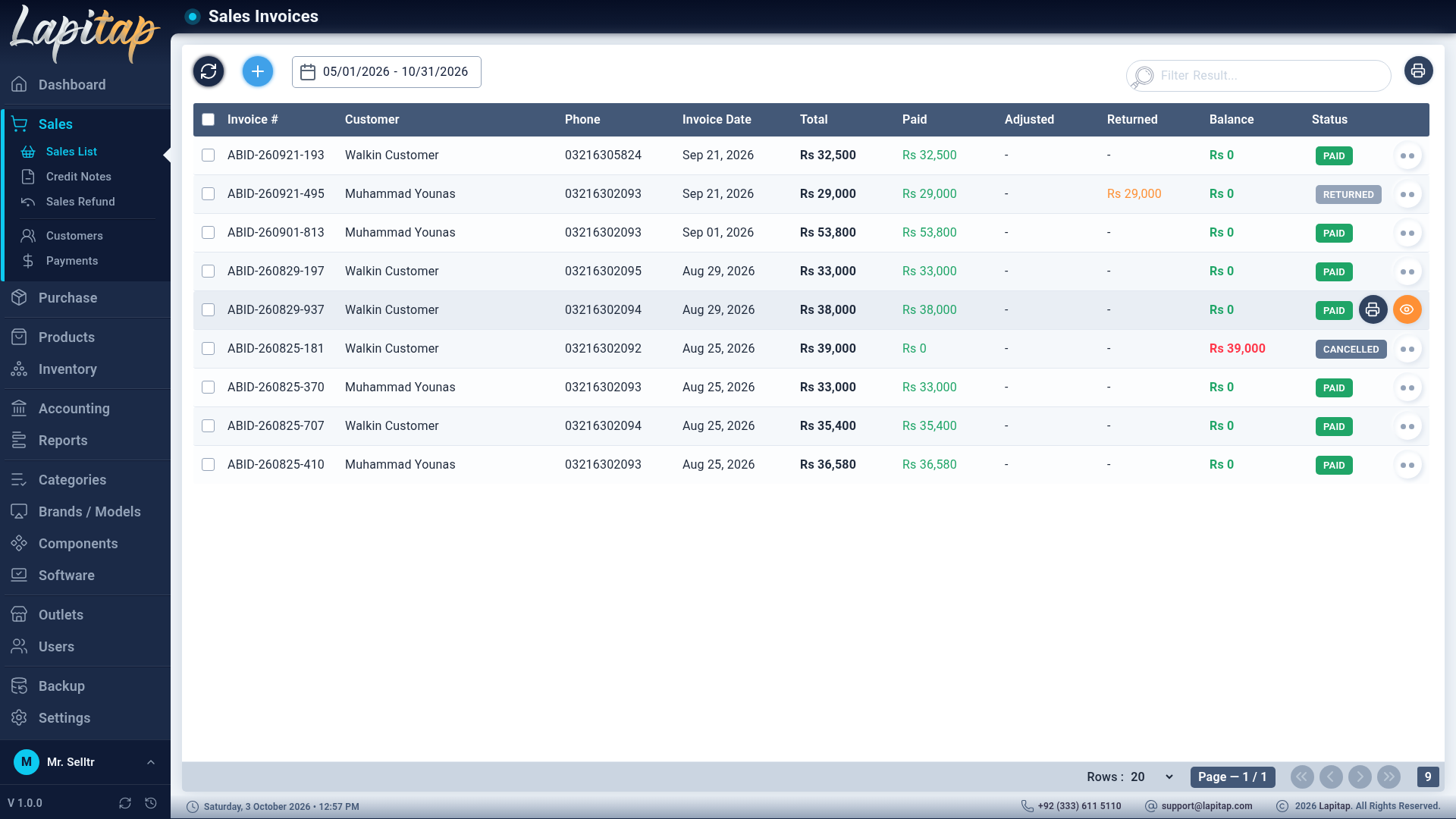
The list#
- Date range (default today), search by invoice code or customer, refresh, + (permission 121).
- Columns: invoice code, customer, dates, Total / Paid / Adjusted / Refunded / Balance, and a status badge.
- Select rows to delete (void) several at once.
- Print Sales List prints the date range with money columns and a totals row.
Create an invoice#
+ opens the invoice form. Esc closes it.
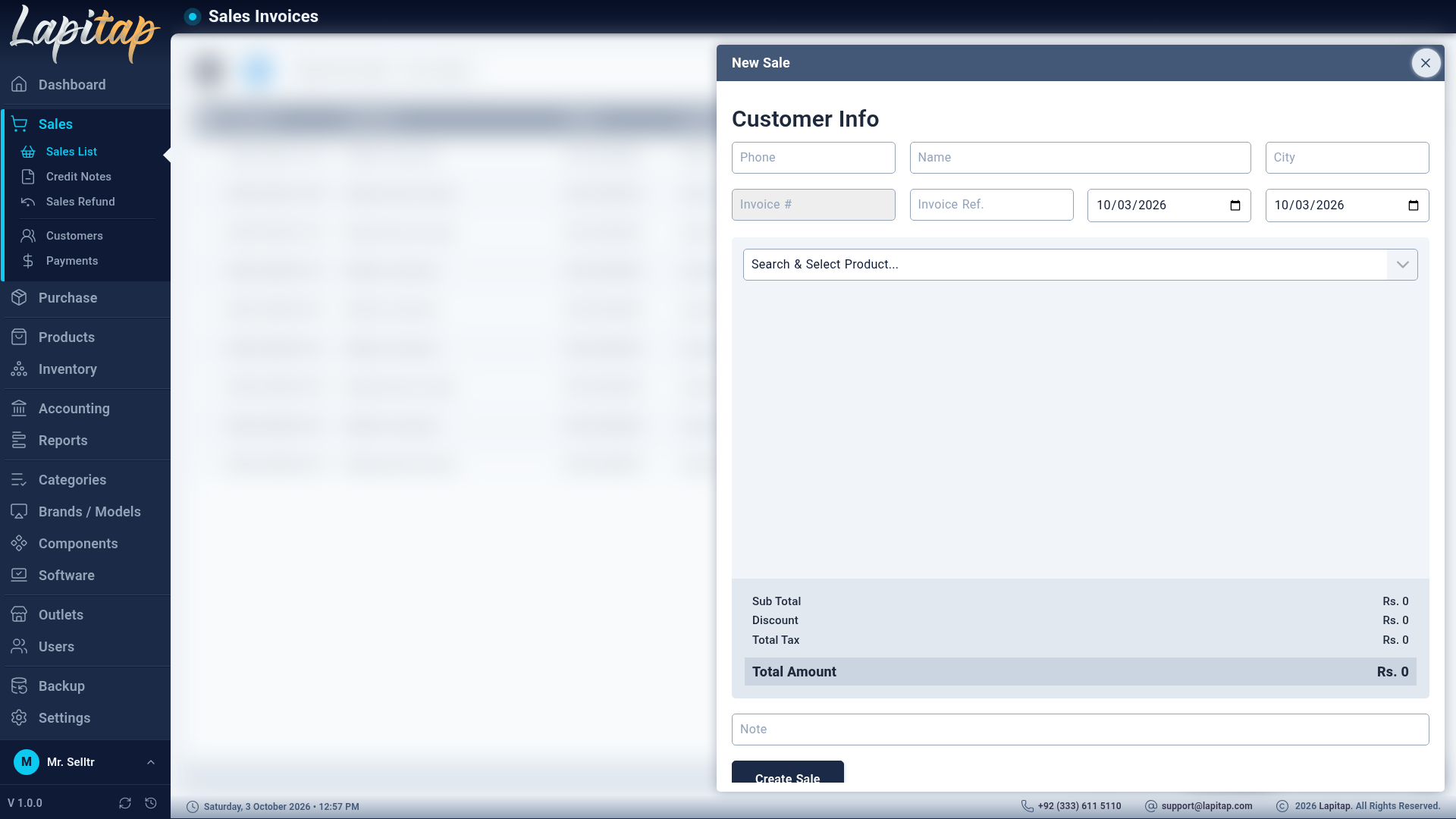
1. Customer#
Type the customer's Phone. Existing customers are matched instantly (then on the server) and their name and city fill in. A phone below 10 digits or not found is treated as a walk-in; the name is optional. A new phone with a name creates the customer for you. Phone is required.
2. Header#
| Field | Rule |
|---|---|
| Invoice # | Generated: <outlet code>-<yymmdd>-<nnn>. Read-only |
| Invoice Ref. | Optional external reference. Must be unique |
| Invoice Date, Due Date | Both required |
| Note | Optional |
3. Items#
Add products by scanning a laptop or searching in the product box. Laptops already in the cart are hidden from the picker.
| Column | Meaning |
|---|---|
| Product | Name |
| Qty | Laptops are always 1. Parts: up to the stock available; at least 1 |
| Price | Unit price — starts from the bargain price (or the sale price if none) × qty |
| Sold | What you actually charge for the line. Edit it to give a discount |
| Disc. | Price − Sold, calculated for you (never negative) |
| Tax | Sold × the combined rate of the taxes ticked on the product's category |
| Total | Sold + Tax |
Trash icon removes a line. Footer shows Sub Total, Discount, Total Tax and Total Amount.
Scanner rules on this form#
A scan adds the laptop only if it exists, is a laptop, is Available and is not already in the cart. Otherwise you get a message such as CODE - Status is Reserved.
4. Save#
Totals are recomputed on the server from the lines — the figures on your screen cannot be tampered with. If the invoice cannot be saved, nothing is changed.
On save, in one all-or-nothing step:
- each laptop becomes Sold (only if still Available);
- parts are deducted from stock — sale outlet first, then Warehouse, then other outlets (you get a warning when stock from several outlets was merged; the sale fails only if no outlet can cover it: Insufficient stock for …);
- the sale journal entry is posted;
- the invoice starts as Pending.
NOTE
You can only create invoices for your own outlet.
Invoice statuses#
| Status | Meaning |
|---|---|
| Pending | Nothing received yet |
| Partial | Part-paid (or part-refunded) |
| Paid | Balance is zero |
| Returned | Fully returned (settled by the return flows) |
| Cancelled | Voided |
Status is recalculated by the system as payments, refunds and credit notes happen. You cannot set Paid, Returned or Cancelled by hand.
Row actions#
| Icon | Action | When |
|---|---|---|
| Eye | View Invoice (125) | Always (if allowed) |
| Printer | Print Invoice | Always |
| Credit card | Collect Payment (124) | While a balance remains |
| Pencil | Edit (122) | Pending only |
| Trash | Delete (123) | Offered on Pending invoices — it voids the invoice |
Edit#
Only Pending invoices can be edited. Changing lines is reconciled against stock automatically: removed lines go back to stock, added lines come out, changed quantities adjust by the difference. The old journal entry is reversed and a new one posted. Moving the invoice to another outlet relocates all its stock in one pass. You can only move it to your own outlet.
Delete = void#
Deleting never erases an invoice: it restores all stock, marks it Cancelled and reverses its journal entry. Only Pending or Partial invoices can be voided (No voidable sales found otherwise). A paid invoice is reversed with a refund or credit note instead.
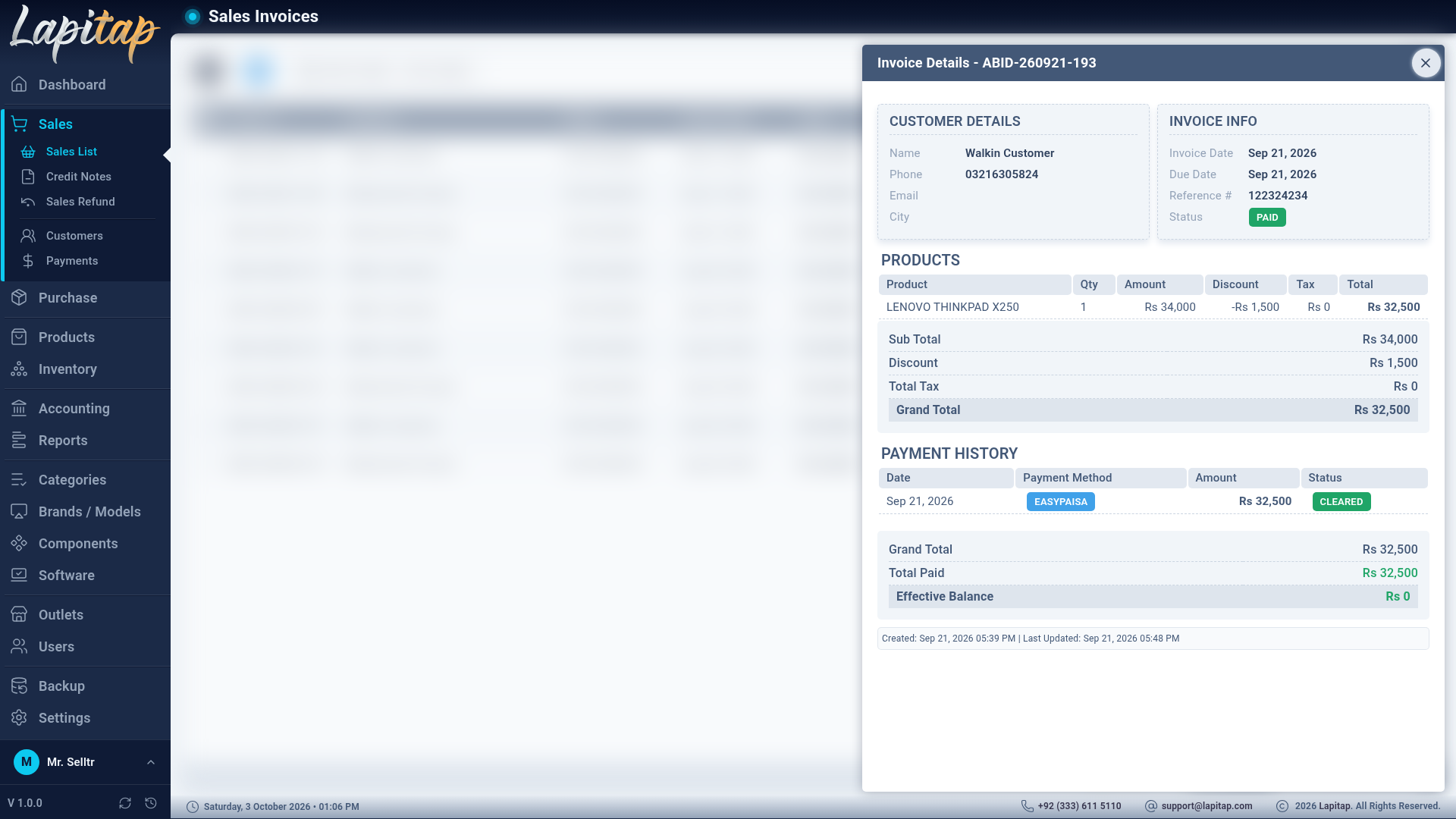
View an invoice#
The read-only view shows the customer, invoice info, product lines, totals and then everything related: refunds, credit-note returns and warranty claims, the payment history, credit notes applied, and the balance breakdown.
Printing#
See Printing — Slip, A5 or A4 with the sale outlet's branding.