
Adding laptops
Every field on the laptop form, the rules, and how to edit, duplicate and delete.
Products → Warehouse → + (permission 201) opens the New Laptop form.
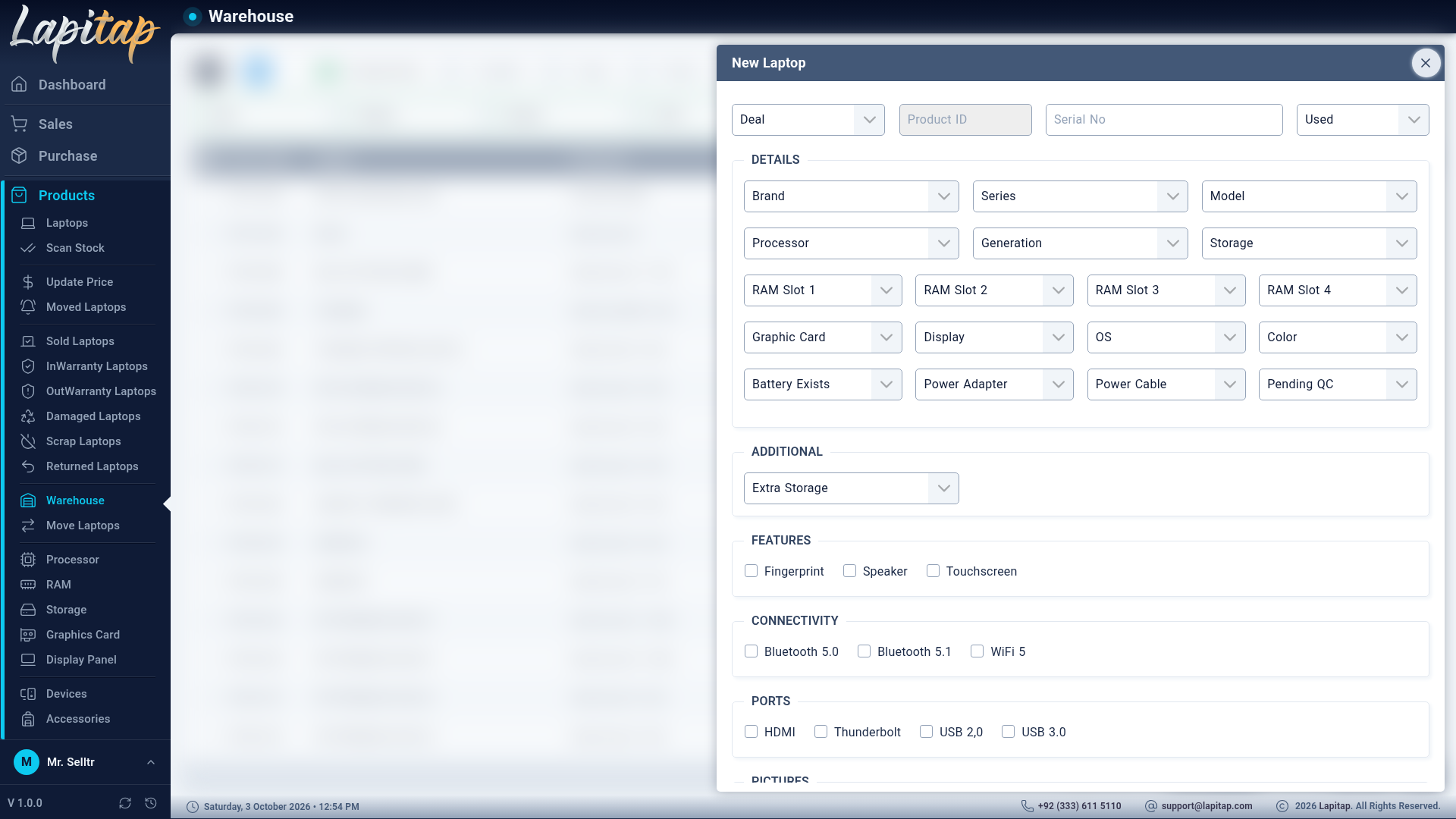
Required#
| Field | Rule |
|---|---|
| Deal | Required. Choose the purchase deal being received. When editing, the deal is shown but cannot be changed |
| Serial No | Required |
| Brand | Required (only brands in the Laptop category) |
The Product ID is generated for you (read-only) the moment you choose the deal, from the deal code and the next free number, and it must be unique.
All fields#
| Group | Fields |
|---|---|
| Identity | Deal, Product ID, Serial No, Product Type — Used, New or Refurb |
| Model | Brand → Series → Model (each list narrows the next) |
| Specification | Processor, Build Year, Generation, Storage, RAM Slot 1–4, Graphic Card, Display, OS, Color, Extra Storage |
| Power | Battery (yes/no), Battery Life, Power Adapter, Power Cable (chosen from parts stock) |
| Details | Features, Connectivity and Ports (tick-boxes) |
| Status | Only if you hold permission 210 |
| Photo | Upload a picture; a preview shows before saving |
On saving, the system:
- locks in the machine's base cost (used later for upgrade accounting),
- stores a snapshot of the original specification (so later upgrades can be compared),
- builds the display name from brand + series + model,
- places the laptop in the Warehouse outlet,
- counts one unit against the deal, and
- logs the action.
Editing#
Edit is available while the laptop is not locked and not Reserved, Sold or Returned. A laptop's name and spec snapshot stay in sync with edits. Stock quantities, product code, category and deal link can never be changed from the edit form.
Duplicate#
Duplicate (copy-plus icon, needs add permission) opens the form pre-filled from an existing laptop, so receiving ten identical machines takes seconds: pick the deal, enter the new serial number, save.
Delete#
Delete (permission 203) asks for confirmation. It is refused if the laptop is locked, or if it is referenced by a sale, a purchase or a reservation — void or return those first. Deleting also gives its unit back to the deal.
Lock / Unlock#
The padlock icon (permission 211) freezes a laptop: no edit, no delete. Not available on Sold or Returned laptops.