
v1 Atlas/Reports & printing
Report catalogue
All 40 reports by group, with their filters and columns.
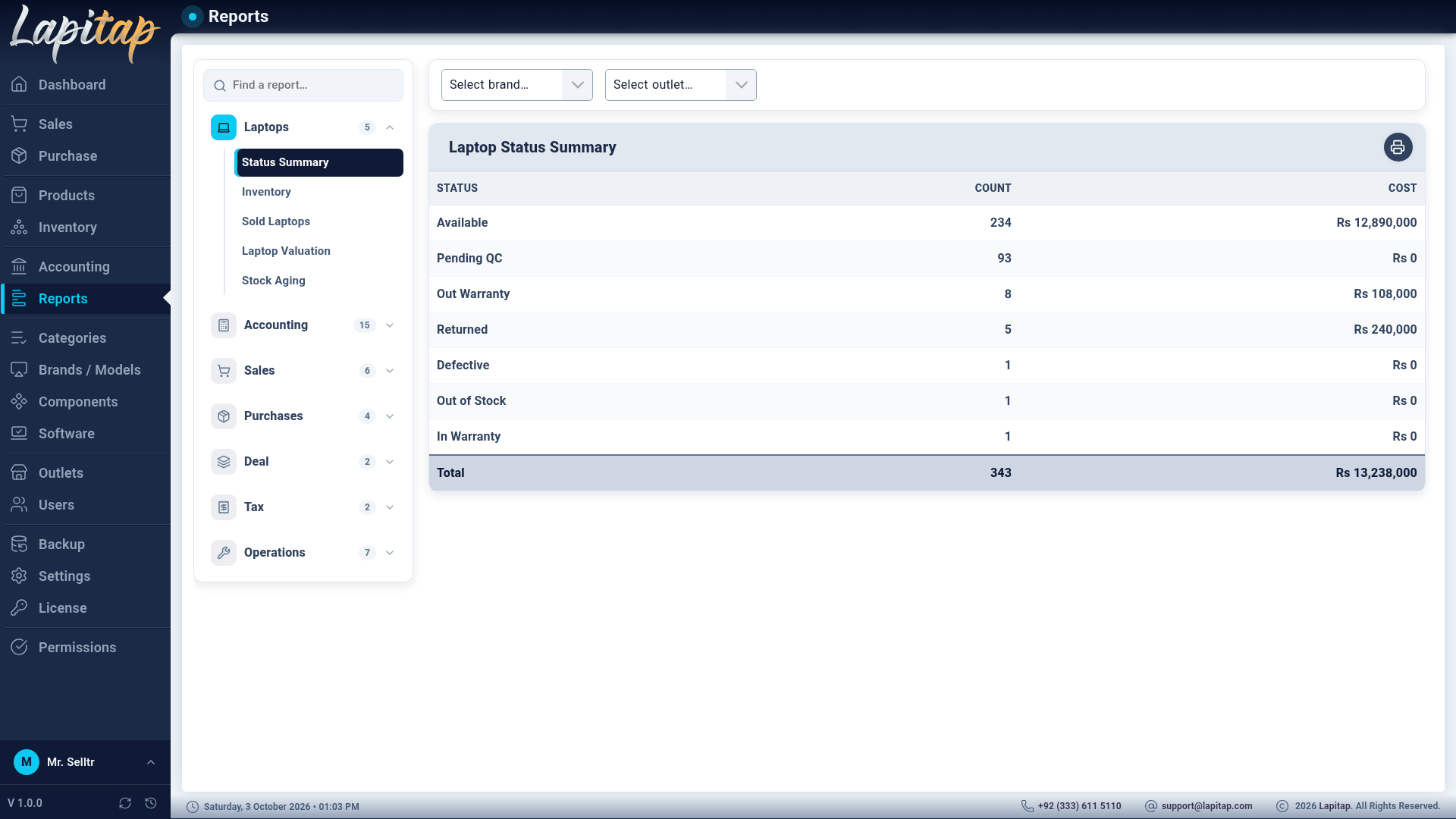
Reports (permission 320) is one screen in three zones:
- Report library (left) — a Find a report… search box and groups that expand to list their reports.
- Filters (top) — only the controls the chosen report needs.
- The report — a summary strip and a table. Every report has a Print button.
Filters used: period (the date-range picker with presets), brand, series, category, outlet, customer, vendor, user, payment method, status, deal.
Reports follow your outlet access, so a branch user sees their branch.
Laptops#
| Report | Filters | Shows |
|---|---|---|
| Status Summary | brand, outlet | Laptop counts by status |
| Inventory | — | By category: serialised and parts quantity and value; and laptop value by outlet × status |
| Sold Laptops | period, brand, outlet | Code, name, cost, sold price, margin, outlet, sold by, date |
| Laptop Valuation | — | Outlet × status: count and cost |
| Stock Aging | — | Code, name, status, age in days, ageing bucket, cost, outlet, brand |
Accounting#
| Report | Filters | Shows |
|---|---|---|
| Balance Sheet, Profit & Loss, Trial Balance, Day Book, Expenses | period | See Financial statements |
| Outlet P&L | period | Per outlet: units, revenue, COGS, gross, expenses, net |
| Cash Book | period, payment method | Date, type, direction, amount, method, party / note |
| Accounts Receivable / Payable | — | By customer or vendor: invoices and Current, 1–30, 31–60, 61–90, 90+ day buckets and total |
| Customer Statement / Vendor Statement | period, customer / vendor | Date, type, ref, debit, credit, running balance, status |
| Payment Methods | period | Per method: sale received and count, purchase paid and count |
| Fund Transfers | period | Date, from, to, amount, status, note |
| Owner Transactions | period | Date, type, amount, method, account, status, note |
| Category Payment Status | period | Per category: purchases, paid, % — sales, paid, % |
Sales#
| Report | Filters | Shows |
|---|---|---|
| Sales by User | period, user | Units, revenue, cost, margin |
| Sales by Outlet | period | Units, revenue, cost, margin |
| Sales by Brand / Series / Model | period | Units, revenue, cost, margin per name |
| Collections by User | period | Payments count and amount collected |
| Refunds & Credit Notes | period | Code, date, amount, status, type, remaining |
| Discount Analysis | period | Code, name, list, bargain, sold, difference vs list and vs bargain, outlet |
Purchases#
| Report | Filters | Shows |
|---|---|---|
| Purchases by Category | period, category | Qty, spend, lines |
| Buy-Ins | period, outlet, payment method | Code, date, seller, CNIC, laptop, status, paid by, paid, sold for, margin (voided ones excluded from totals) |
| Purchases by Vendor | period | Invoices, qty, spend |
| Returns & Debit Notes | period | Code, date, amount, status, type, remaining |
Deal#
| Report | Filters | Shows |
|---|---|---|
| Deal Report | deal | One deal: cost, stock, sales, warranty liability (open claims on In-Warranty laptops) |
| Deal Portfolio | — | Every deal: invoice, date, age, bought, cost, sold, revenue, left and left cost |
Tax#
| Report | Filters | Shows |
|---|---|---|
| Tax Summary | period | Tax collected (sales), tax paid, net payable |
| Tax Payments | period | Date, amount, method, status, note |
Operations#
| Report | Shows |
|---|---|
| QC Pipeline | Laptops waiting in QC statuses: count and cost per status |
| Outlet Moves | Laptops currently Moved: code, name, outlet, brand, cost, recent moves |
| Parts Health | Low stock (quantity at or below a threshold, default 2) and slow-moving parts (no movement for at least a number of days, default 90) |
| Write-Offs | Damaged / Scrap / Defective laptops and their cost |
| Reserved Stock | Reserved laptops: customer, outlet, cost, sale price, reserved date |
| Warranty | Warranty components: laptop, component, amount, status, added, outlet |
| Upgrades | Period: date, code, product, outlet, items, cost impact, user |
TIP
The Deal Portfolio and Stock Aging reports are the quickest way to spot capital stuck in old stock.