
v1 Atlas/Administration
Updates
See your version, check for updates, install and roll back.
v1 updates itself from Lapitap's signed update feed. Only releases of your own line (1.x.y) are ever offered.
The version row#
At the bottom of the sidebar: v 1.x.y and icon buttons.
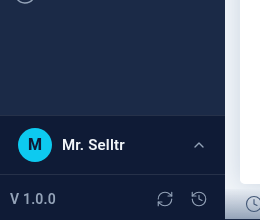
| Button | Who | Action |
|---|---|---|
| Check for updates | Everyone signed in | Asks the feed. Messages: Update vX available (with Ask an administrator to install it if you are not one), You're on vX (up to date), or a notice that the release needs an earlier version first |
| Update now | Super admin | Opens Install update vX? The app will restart briefly. Continue? |
| View history | Super admin | Opens Previous versions to roll back |
The server also checks automatically on a schedule and once when it starts, so update available appears without anyone clicking.
What happens when you install#
- The signed manifest and files are downloaded and verified (signature and checksum).
- A snapshot of the running version is saved to
backups/releases/. - The new version replaces the old one and the server restarts.
- A health check runs. If it fails, the previous version is restored automatically.
Progress toasts report success or one of failed, failed — rolled back, or needs manual intervention (contact support).
Your database is never touched; config/local.json, the licence cache, uploads and logs are preserved.
Rolling back#
View history → Previous versions, choose a target and confirm. Super-admin only.
Good practice#
- Update outside trading hours — the app restarts for a few moments.
- Take a backup first.
- After an update that introduces new screens, check Roles & permissions.
Release rules: Product lines & versions.